Play Football 2026
Game didn’t load
The connection may be blocked or slow. Retry, or open the unblocked guide for school/work networks.
Rotate your phone to landscape for a larger pitch and easier touch controls.
Choose How You Play
One click to load. Play a full friendly right now — and read up on the cup and penalty modes while they're on the way.
Quick Match
No stakes single game — perfect for a short break or warming up controls.
Play now →Tournament Mode Guide
Our mini world cup bracket guide — the mode is marked Coming Soon in-game and lands with a future update.
Learn the bracket →Penalty Practice Guide
Spot-kick technique, keeper-reading, and nerve — ready for the day the penalty mode lands in-game.
Master penalties →Free Soccer Guides Worth Opening
Looking beyond one match? These pages target the most common free online soccer searches — then bring you back here to play.
Unblocked Soccer Games
Play free football in the browser on many school and work networks — no install, HTTPS only.
Unblocked guide →Best Free Soccer Games Online
Compare free football games with no download — modes, mobile, ads, and load speed ranked.
See the ranking →Free Penalty Shootout Guide
Placement, keeper patterns, and composure from the spot — the free online penalty guide.
Penalty guide →How to Play on Desktop, Tablet & Mobile
Press Start to load the game. The page detects your device, shows matching control hints, and on phone/tablet automatically expands to fullscreen from that first tap.
- Desktop: Arrow Keys or WASD to move; J to pass, K to cross, E for through balls, Space to shoot, P to pause. F/R/Esc control this page's player. Plug in a USB/Bluetooth gamepad — a green hint appears when it is detected.
- Tablet: Tap Start once — the player auto-expands and on-screen touch controls appear. Exit anytime with the top Exit control or Esc.
- Phone: Tap Start for auto fullscreen, then rotate to landscape when you can. Use the sticky Play bar if you scroll away from the player.
- If input stops responding, tap Focus (or click inside the player) once to refocus the game frame.
Game Screenshots
Preview the match UI, pitch action, goals, and stats before you load.

Match Setup Interface
Pick your nation and opponent, check the friendly card, and kick off.

On-Pitch Action
Control your squad on a full-sized 3D pitch with a live scoreboard.

Matchday Presentation
Walk out of the tunnel in a full 3D stadium with crowds and 2026 branding.

Squad Lineup & Ratings
Review positions and player ratings before every kickoff.
Watch Gameplay Footage
A quick look at passing, dribbling, and goals so you know what to expect from your first match.
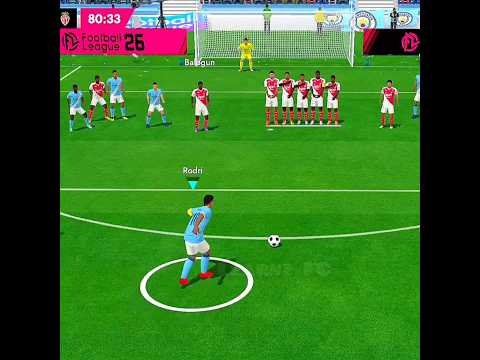
Gameplay Highlights
Watch on YouTube. The player above gives you the same experience — jump in anytime.
About Football 2026 — Fast Browser Soccer with Real Match Depth
Football 2026 is a browser-based soccer game that focuses on quick, no-fuss matches you can jump into within seconds. Unlike heavy football simulators that demand downloads, account creation, or endless menu navigation, this one puts you straight onto the pitch. The controls are simple to pick up — arrow keys or WASD for movement, with action keys for passing, shooting, and tackling — but the AI opponents are smart enough to keep every match competitive.
What sets it apart is where it's heading. The in-game menu already lists a mini world cup tournament and a league — both marked Coming Soon — on top of the live friendly mode, where you face international opponents whose AI reads your patterns: some press high up the pitch, others sit deep and counter. Reading the AI within the first minute of a match is the difference between an early exit and lifting the cup. For anyone searching for a quick football fix without the grind of a full-season career mode, this format hits the sweet spot.
Game Modes — More Than Just a Kickabout
Right now, the Friendly match is the heart of the game: pick any two nations and play a full 3D match with no stakes — perfect for warming up or squeezing in a short session. Two more ways to play are on the roadmap: the Tournament mode (a mini world cup bracket where every round raises the difficulty) and Penalty Shootout (pure finishing — you versus the goalkeeper from the spot). Both are marked Coming Soon in the in-game menu, and our tournament and penalty guides get you ready for the day they land.
Until then, friendlies are your training ground: test new tactics, practice finishing in open play, and build the habits that will carry into a deep tournament run. The variety keeps the experience fresh without overcomplicating the core loop.
Controls That Work Across Devices
On a desktop or laptop, the keyboard controls give you precise command over your players. Arrow keys or WASD handle movement; J passes, K crosses, E plays through balls, Space shoots, and P pauses. On mobile, on-screen touch buttons appear automatically, sized large enough to tap accurately without covering the action. The game detects your device and adjusts accordingly — no settings menu required.
For the best experience, use a desktop browser like Chrome or Edge with the fullscreen button. A larger screen makes it easier to spot passing lanes, track defender positioning, and time your tackles. But the game holds up well on tablets too, especially for quick matches on the go. Full details: Football 2026 controls guide.
Features That Make It Worth Coming Back
3D Stadium Atmosphere
Full 3D pitch with animated crowds, dynamic lighting, and smooth player animations. The ball physics feel responsive and natural, rewarding well-timed through-balls and angled shots.
Full International Squads
Pick any nation and face the AI in a complete friendly — real lineup screens, named players, and live match presentation with 2026 branding.
Cross-Device Play
Keyboard and touch controls both supported. Switch from desktop to mobile without changing settings — the control scheme adapts to your screen automatically.
Tips to Win More Matches
Pass before defenders close the gap. The most common mistake new players make is holding onto the ball too long in midfield. A quick one-two opens far more space than trying to dribble past two defenders.
Shoot early when the keeper drifts. Goalkeepers sometimes rush forward or shift to one side during build-up play. If you notice them off their line, don't wait for the perfect angle — strike before they recover.
Vary your attack patterns. Predictable straight-line runs get shut down quickly, especially in later tournament rounds. Mix short passes with long through-balls, use the wings, and cut inside at different angles to keep the defense guessing.
Stay patient on defense. Don't chase the ball with every defender. Position your back line to block passing lanes and tackle only when you have a clear angle. Over-committing usually leads to conceding, and in tournament mode one goal can end your run.
Practice set pieces. Corners and free kicks are direct scoring chances that don't depend on build-up play — and when the penalty mode arrives, that shooting practice will matter even more in tight knockout games. More depth in our game tips and tournament strategies.
Why Football 2026 Is One of the Best Free Soccer Games Online
Among the many free soccer games online and free football games you can open in a tab, Football 2026 stands out for what it does not require: no download, no installation, no account creation, and no waiting through ads before you can play. You open the page and you are on the pitch within seconds — on a school Chromebook, a work laptop, or a phone during a break.
That same setup makes it a strong pick for unblocked soccer games and unblocked football games. Because it runs entirely in the browser over HTTPS, it is often available on networks that block game downloads and executable files. Students looking for football games at school, workers on a quick break, or anyone who wants soccer online without an app install land on the same instant-play experience. Full walkthrough: unblocked soccer games guide.
And it's built for more than a kickaround. While most browser soccer games stop at a single exhibition match, Football 2026 ships with named international squads, lineup screens, and full match presentation — with a mini world cup knockout bracket and penalty shootout marked Coming Soon in the menu. Our free penalty shootout guide and no-stakes friendlies cover practice and play in one place. See how it ranks against other titles in our best free soccer games online comparison.
Browser Compatibility
The game runs on Chrome, Firefox, Edge, and Safari using standard web APIs. No plugins, no downloads, no special software. As long as you have a modern browser and an internet connection, you are good to go. If the game does not load immediately, a quick page refresh usually fixes it. Stuck? Check the FAQ troubleshooting answers.
How Football 2026 Compares to Other Free Soccer Games
If you are searching for the best free soccer games online, a browser football game, or comparing free football games no download, start with our ranked guide: best free soccer games online (no download). It compares Football 2026 with Head Soccer, dedicated penalty titles, and other browser football games on modes, mobile support, ads, and load time.
Want a longer narrative take? Read the Football 2026 review for graphics, AI, and session length notes.
Learn More About Football 2026
For a complete beginner's walkthrough, advanced tournament strategies, and comparisons with other free browser soccer games, visit the Football 2026 Blog. Community notes live in the comments; troubleshooting is in the FAQ and full FAQ page.
Also useful: controls guide · game tips · tournament strategies · free penalty shootout game · tournament mode · unblocked soccer games.
Related Picks
More Games You May Like
Frequently Asked Questions
Quick answers. For the full set, visit the complete FAQ page.
How do I start playing Football 2026?
Click the Start button on this page — the game loads in your browser with no download or sign-up. Use Arrow Keys or WASD to move; J passes, K crosses, E plays a through ball, and Space shoots.
What game modes are included?
Full international friendlies against AI are live now. The in-game menu also lists World Cup and League modes marked Coming Soon — they arrive with game updates. Our tournament guide and penalty guide cover both in the meantime.
Can I play on mobile or tablet?
Yes — on-screen touch controls appear automatically. On phones and tablets, the first Start tap also auto-expands to fullscreen (with an iOS expand fallback when the browser blocks native fullscreen). Rotate to landscape when you can. A sticky Play bar keeps the player one tap away if you scroll.
Is Football 2026 really free?
Yes — the game is completely free. No payments, subscriptions, or paywalls required to play.
Which browsers work best?
Chrome and Edge deliver the best performance. Firefox and Safari also work. JavaScript must be enabled — no plugins or downloads required.
Why is the game not loading?
Refresh the page, ensure JavaScript is enabled, and try Chrome or Edge. Click inside the player if it appears stuck. More fixes on the FAQ page.
Community
Anonymous Comments
Comments are anonymous and visible to other Football 2026 players. No account required. Keep it respectful — no links or spam.